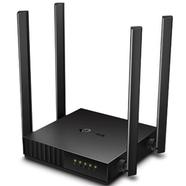
AC1200 Router
An AC1200 Router is a dual-band Wi-Fi device that gives you a combined speed of up to 1200 Mbps. It is a smart and budget-friendly choice for modern homes. It provides 300 Mbps on the 2.4 GHz band for longer range and 867 Mbps on the 5 GHz band for faster speeds, which is great for smooth 4K streaming, online gaming, and connecting many devices at once without the internet slowing down.
Key Benefits of AC1200 Routers
- Dual-Band Speed: You get two separate Wi-Fi networks. 2.4 GHz for long-range and 5 GHz for super-fast, close-range use. The 5 GHz band is useful for gaming and streaming 4 K movies.
- Perfect for Many Devices: It works easily on many phones, laptops, and smart TVs at the same time without slowing down.
- Budget-Friendly: You get fast Wi-Fi performance without breaking the bank. Most AC1200 routers in Bangladesh cost between TK. 2,000 and TK. 5,500.
- Easy Setup: Most brands, like Tenda and TP-Link, offer easy apps and web-based setup options. So you can easily set up and manage it.
- Good Coverage Area: AC1200 routers typically cover 1,000–1,500 square feet, which is enough for a flat or a small office with 3–5 rooms.
- Parental Controls & Guest Wi-Fi: You can block access to harmful websites for children and create a separate Wi-Fi network for guests.
- Low Power Consumption: These routers use very little power, so that you can run 24/7 without a big impact on your electricity bill.
Best AC1200 Routers in Bangladesh
Here are the top AC1200 routers available in Bangladesh. These are covering home routers, mesh systems, and access points. Prices range from TK. 2,000 to TK. 5,500, so there is a perfect option for every budget, home size, and need.
| Model | Key Features | Price (BDT) |
| TP-Link Archer C54 Dual-Band | 4 Antennas, MU-MIMO, Beamforming, Easy Tether App Control, Multi-Mode 3-in-1 | 2,100 |
| D-Link DIR-841 Gigabit Router | 4 Antennas (5dBi), MU-MIMO, Gigabit WAN Port, High-Performance 1GHz CPU | 2,559 |
| Tenda AC10 AC1200 Gigabit | 4 Antennas (6dBi), Gigabit Ports, Powerful 1GHz CPU, Beamforming+, USB Support | 3,249 |
| Netgear R6220 Smart Wifi Router | Gigabit Ports, Dual-Core Processor, Netgear Genie App, Advanced quality of service, High-Powered Amplifiers | 5,259 |
| Cudy AC1200 Whole Home Mesh System | Dual-Core CPU, Seamless Roaming, MU-MIMO, Gigabit Ports, Easy App Control, Covers Up to 3,000 Sq. Ft. | 2,699 |
| Tenda AC5 Ethernet Dual-Band | 4 Antennas (5dBi), 1GHz CPU, MU-MIMO, Beamforming+, Easy App Management | 2,049 |
Top Brands of AC1200 Routers in Bangladesh
When buying a new router in Bangladesh, choosing a trusted brand is the first step to a good experience. Several global companies offer strong, reliable AC1200 models that meet both budget and high-speed needs. Top brands like TP-Link and D-Link are known for building strong, long-lasting devices
You can also find amazing options from other trusted brands, such as Tenda, Cudy, and Netgear, on Rokomari.com. Whether you live in a small flat or a large house, these brands have something perfect for you.
How to Choose the Right AC1200 Router
Follow these simple tips to pick the Right AC1200 WiFi Router:
- Know Your ISP Speed: If your internet plan is above 100 Mbps, always choose a router with a Gigabit WAN port (like the Tenda AC8, AC10, Cudy, or Netgear R6220). Otherwise, the router can sometimes slow down your internet speed. If your plan is for 100 Mbps or less, a router with Fast Ethernet ports, such as the TP-Link Archer C54, will be perfect.
- Think About Coverage Area: For a small flat with 2–3 rooms, any AC1200 router will work. For larger homes or offices, choose a mesh system router like Cudy AC1200 Mesh.
- Count Your Devices: If you connect 10+ devices for regular use, choose a router with MU-MIMO technology so all devices get served perfectly without lag.
- App-Based Setup: If you are a beginner or want to manage your Wi-Fi more comfortably, choose a router with a mobile app setup (such as the Tenda, Cudy, or NETGEAR genie app). It makes configuration much easier than typing an IP address in a browser.
- apps and web-based setup options. So you can easily set up and manage it.
- Good Coverage Area: AC1200 routers typically cover 1,000–1,500 square feet, which is enough for a flat or a small office with 3–5 rooms.
- Parental Controls & Guest Wi-Fi: You can block access to harmful websites for children and create a separate Wi-Fi network for guests.
- Low Power Consumption: These routers use very little power, so that you can run 24/7 without a big impact on your electricity bill.
Tips for Getting the Best Wi-Fi Performance
- Place the Router Middle: Place your router in the center of your home or office. So the Wi-Fi signal reaches everywhere equally.
- Put It Up High: Keep the router on a table or shelf, not on the floor, because Wi-Fi signals travel outward and slightly downward from the antennas.
- Avoid Walls and Obstacles: Keep the router away from thick concrete walls, as they can reduce Wi-Fi signal strength. Try to minimize the number of walls between the router and your device.
- Choose the Right Signal: Connect to 5 GHz for fast internet when you are close to the router, and use 2.4 GHz when you are farther away.
- Restart Regularly: Turn your router off and on once a week to keep it safe and working well.
- Keep Firmware Updated: Check for updates every few months. They fix bugs, improve stability, and patch security issues.
Frequently Asked Questions (FAQs)
What does AC1200 mean on a router?
The AC1200 means the router supports fast, modern Wi-Fi speeds up to 1200 Megabits per second, using two separate wireless signals simultaneously.
What is a Mesh Wi-Fi system?
A mesh system uses multiple small devices placed around your home or office to create a single, strong Wi-Fi network in every room.
How many devices can an AC1200 router handle?
Most of these routers can easily handle 15 to 30 devices simultaneously without slowing down your internet.
Explore More Networking Products from Rokomari.com
Router Brands: TP-Link | Cudy | D-Link | Netgear | Redmi | Toto Link
Router Categories: Gaming Router | 2 Antenna Router | 3 Antenna Router | 4 Antenna Router | Deco Router | TP-Link 3 Antenna Router | TP-Link AC1200 Router | Gigabit Router
Browse our complete collection of Networking and Wi-Fi Accessories and Routers to find everything you need for a powerful, reliable home or office network!
 Hotline: 16297 (9 AM to 8 PM)


 Hello, Sign in
 Cart
Cart